

It is currently 04 Mar 2026, 04:21


Pulsar Calculation Alarm LCD - how to set time ?

Owners of VINTAGE DSM and LCD watches post their topics over here
  • Author
  • Message
Offline

kimceee

Newbie

Newbie

  • Posts: 2
  • Joined: 14 Dec 2011, 18:31

Pulsar Calculation Alarm LCD - how to set time ?

Post14 Dec 2011, 22:35

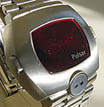
my father has a vintage Pulsar Calculator Alarm watch. # 090991
We can not remember how to set it.
the only instructions I found online is for the earlier led model with a pulsar/command button.
This watch does not have that button.
If any one has any ideas, please let me know
Image

Uploaded with ImageShack.us[/img]
Offline
User avatar

bucko170

Guru

Guru

  • Posts: 3650
  • Joined: 20 Oct 2007, 11:47
  • Location: Nottinghamshire: The Home of Robin Hood..... UK

: Pulsar Calculation Alarm LCD - how to set time ?

Post15 Dec 2011, 01:16

Full Manual Here: http://service.seiko.com.au/i/seiko/doc ... /Y739A.pdf

Or available to download on the digitalwatchlibrary:: http://www.digitalwatchlibrary.com/DWL/ ... y739-5019/

I think you will have to become a member in order to access them.

Info from a previous DWF thread -

To Set The Time
(Example 9:45 PM)

Press AC (gets you into calculator mode)
Press '9'
Press 'T'
Press '45'
Pres '+/-' to toggle AM/PM
Press 'S' to finish

Welcome to the forum :-D
Offline

kimceee

Newbie

Newbie

  • Posts: 2
  • Joined: 14 Dec 2011, 18:31

: Pulsar Calculation Alarm LCD - how to set time ?

Post15 Dec 2011, 03:44

thank you so much. That's a big help . I appreciate it very much.

Return to Vintage DSM and LCD Watches

Who is online

Users browsing this forum: No registered users and 112 guests